

Brand Photography Tools and Software: My Complete Business Stack
- 2 days ago
- 5 min read
A transparent, full-stack look at what keeps this brand photography business running — from first inquiry to final delivery.
✦ Some links below may be affiliate links, which means I may earn a small commission if you sign up, at no extra cost to you. I only ever share tools I genuinely use and love. Where an affiliate link is available, it's noted alongside each tool.
People ask me all the time: what software do you use to run your photography business?
Not just the creative side, but the behind-the-scenes, the admin, the systems.
So here it is. Every single tool I use at Wild Kind Photography, organized by category and shared with complete transparency.
Whether you're a brand photographer yourself, or simply curious what goes into running an intentional creative business, this one's for you.
The Best Software for Managing Your Photography Client Journey
The client experience is everything in brand photography and it's something that I'm proud to say has received loads of positive praise over the years.
These are the tools that keep my bookings, meetings, automations, and shoot preparation running seamlessly so clients feel guided from first enquiry to shoot day.
CRM + Booking: VSCO Workspace
My all-in-one studio management system, formerly Táve, handling client relationships, workflows, contracts, invoicing, lead tracking, and scheduling in one place. I have been using it for YEARS and it's getting better and better. VSCO Workspace | ✦ Affiliate Link ✦
Meetings: Google Meet
Simple, reliable, and free. I use Google Meet for all client video calls, discovery conversations, and creative direction sessions. It both can record, and transribe my videos which is great for my forgetful brain! Google Meet
Shoot Plan Creation: Google Forms + Google Slides
I use Google Forms for my shoot planning client questionnaires and Google Slides to build beautifully structured shoot plans. Both are free, flexible, and easy to share. Google Workspace
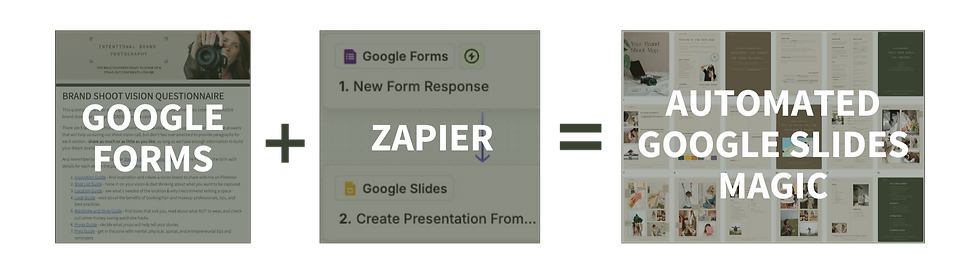
Workflow Automation: Zapier
Zapier connects some of my tools together and automates trigger actions across my workflow, saving hours of manual admin every shoot. Zapier
Screen Recording: Vento
Vento is where I record and share screen recordings with clients, from shoot prep walkthroughs to delivery guides, keeping everything clear and professional without a lengthy back-and-forth. Vento
How I Manage, Edit, and Deliver Brand Photography Images
From the moment I finish a shoot, to the moment a client downloads their gallery, there are multiple tools working in the background to keep image quality high and delivery smooth.
Here's my full photo workflow stack:
Gallery Delivery: Pixieset
My client galleries live on Pixieset, a beautifully designed and intuitive platform that makes the delivery experience easy and elevated. Pixieset | ✦ Affiliate Link ✦
Culling: Narrative Select
Narrative Select speeds up the culling process, using smart AI to surface the strongest selects from every shoot so I can focus on editing, not sorting. Narrative Select | ✦ Affiliate Link ✦
Editing and Exporting: Lightroom
Adobe Lightroom is still my main editing home. It's where my presets live, my color grading happens, and my final exports are produced. Adobe Lightroom
AI Editing Help: Imagen AI
Imagen AI learns my editing style and applies my Lightroom presets intelligently, cutting editing time while keeping results consistent with my aesthetic, although they often need tweaks. They most time they save me is on straightening. Imagine AI | ✦ Affiliate Link ✦
Online Backup: Backblaze
Every shoot is backed up to Backblaze, automatic and continuous cloud backup that gives me total peace of mind that nothing is ever lost. Backblaze
Web Image Compression: ShortPixel
Before images go live on my website, ShortPixel compresses them without visible quality loss, keeping my site fast and SEO-healthy. ShortPixel
Alt Text Generation: AltText.ai
AltText.ai automatically generates accurate, descriptive alt text for my images, saving significant time while keeping my website accessible and SEO-optimized. AltText.ai | ✦ Affiliate Link ✦
The Best Software for Managing Photography Business Finances
Running a profitable photography business means having the financial side under control, from how clients pay to how I track everything come tax time.
Credit Card Processing + Checkout: Stripe Stripe handles all my payment processing, secure, professional, and seamlessly embedded into my client checkout experience. Stripe
Accounting: QuickBooks
QuickBooks is where I keep my books and tax prep all in one place. Non-negotiable for running a real business. QuickBooks
How I Host Online Courses and Educate Other Photographers
Education is part of the Wild Kind ecosystem and this tool makes it possible to teach, share, and scale knowledge beyond one-to-one sessions.
Course Platform: ThriveCart Pro
ThriveCart Pro is my course platform of choice, combining beautifully designed checkout pages with a full learning portal, all in one lifetime-access tool. ThriveCart
My Social Media Toolkit for Brand Photographers
Even though social media can be an absolute SLOG, these tools make it a bit more sustainable.
Scheduling: Vista Social
Vista Social is my go-to for scheduling posts across platforms, intuitive, well-designed, and built for creative businesses who want to plan ahead without losing spontaneity. I would be lost without it. It handles my DM automations, and even allows me to duplicate past content so I can repurpose months and even YEARS later. And I can use it to schedule to Youtube and google my business - massive bonuses. Vista Social | ✦ Affiliate Link ✦
Designing: Canva
If you run a business and haven't heard of Canva, where have you been?? Canva is where branded graphics, carousel templates, and visual content come to life, keeping everything on-brand and beautifully consistent across every touchpoint. Canva
Video Editing: CapCut
For Reels, short-form video, and behind-the-scenes content, CapCut makes editing fast and cinematic with an easy-to-use interface that has a free plan. CapCut
The Marketing Stack Behind a Brand Photography Business
Visibility doesn't happen by accident. These are the tools that underpin my marketing, from the website that attracts enquiries to the email sequences that nurture the right clients toward booking.
Web Host: Wix
My Wild Kind Photography website lives on Wix, flexible, visual, and easy to update myself without needing a developer every time something changes. Wix
Email Platform: MailerLite
MailerLite powers my email list, newsletters, automations, welcome sequences, and opt-in delivery all run through here. It's got a clean interface that makes it much easier to use than I found mailchimp. MailerLite
AI Strategy Helper: Claude
Claude is my AI thinking partner. I use it for caption ideas, strategy, drafts, and anything that benefits from a second (very capable) brain. Claude
And there it is, my entire software stack that helps me run Wild Kind Photography.
Every tool listed here has earned its place and saved me so much time, while keeping me on brand across the board.
I'll keep this updated as I discover and start using new software, but if you have questions about how I use any of these in practice, drop them in the comments or come find me over on Instagram.


